👋 New here? Start here!
Scroll down for bite-sized lessons — like Stories or Shorts. Each card = one idea. No boring walls of text.
Pro tip: Use the nav bar above to jump to any service quickly.
📈 Service 1: Portfolio
Purpose
Keep all your investments in one place. Whether you hold stocks (AAPL, MSFT), ETFs (VGRO, XEQT), or mix of accounts — see real-time prices, profit/loss, and transaction history. Perfect for DIY investors and anyone with multiple brokerages.
How to use
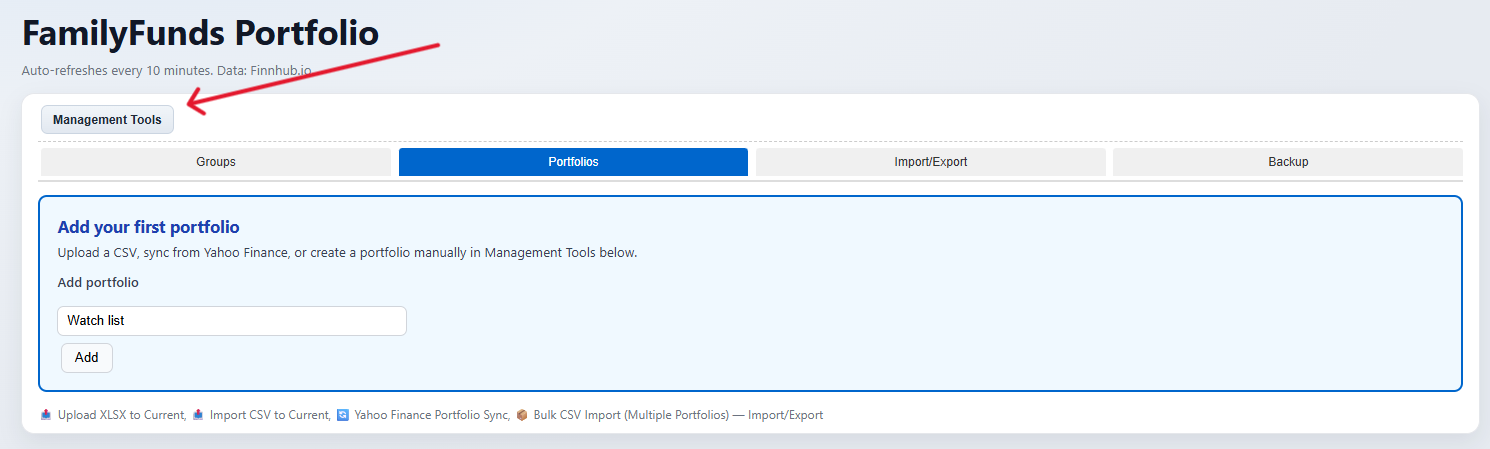
Go to Portfolio → Management Tools → Portfolios tab. Type a portfolio name (e.g. Watch list, RESP) and click Add.
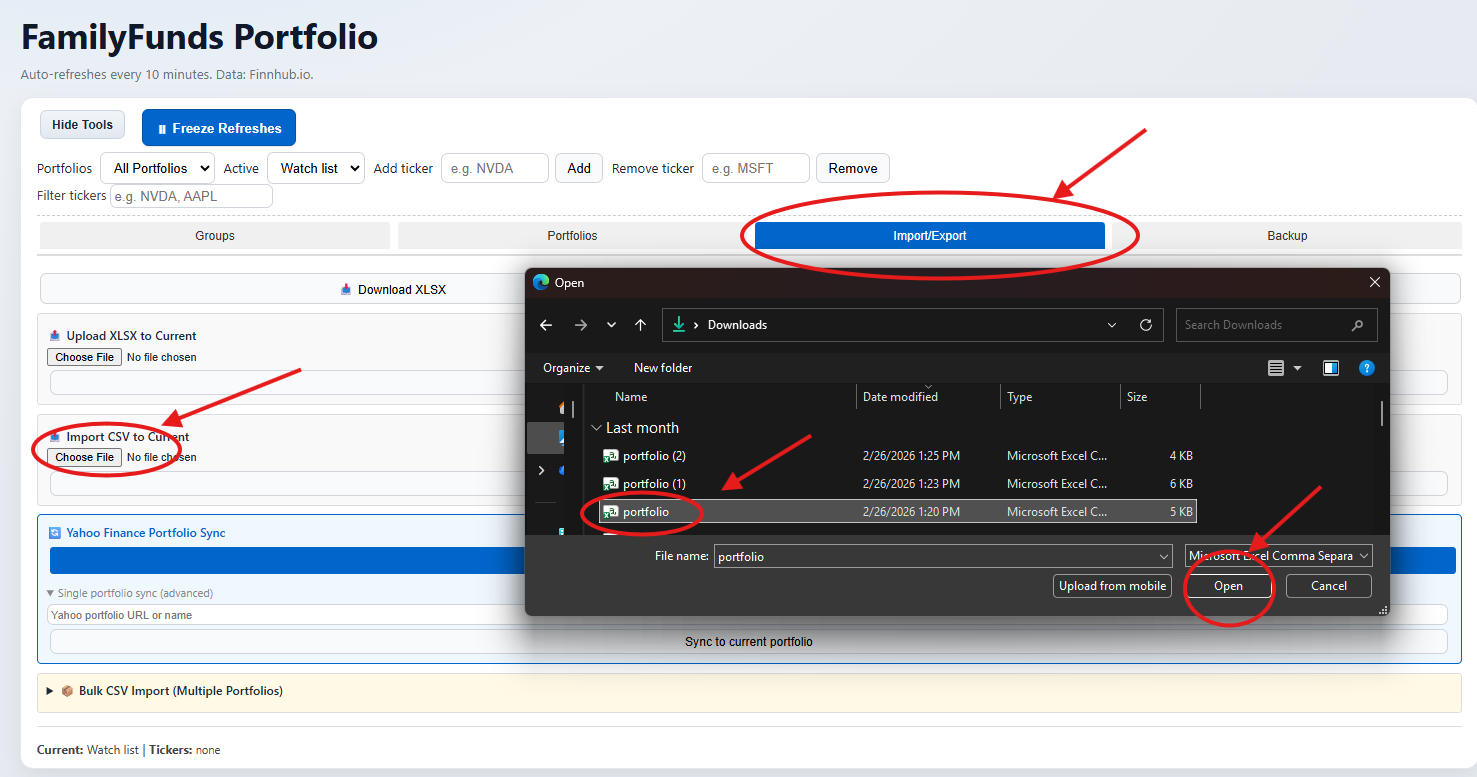
Open Import/Export tab. Click Import CSV to Current, choose your broker CSV file and click Import. Also supports XLSX and Yahoo Finance sync.
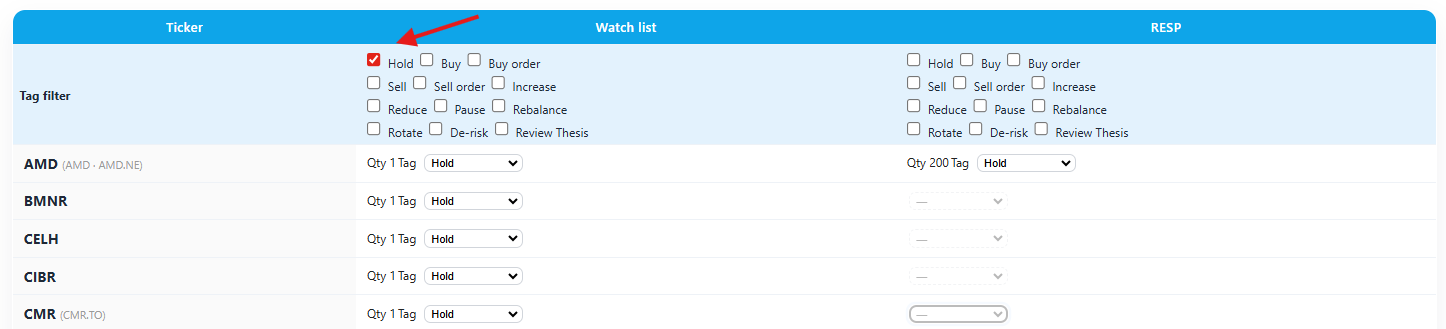
Use the Groups tab to tag each position: Hold, Buy, Sell order, Increase, Reduce, Rebalance and more. Filter across all portfolios simultaneously.
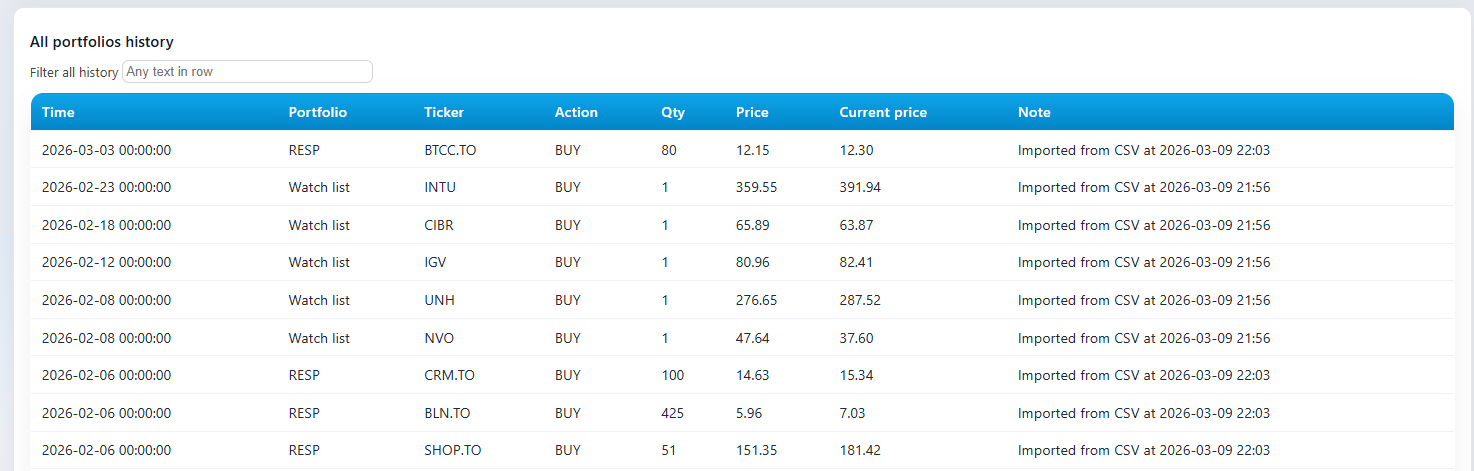
The All Portfolios History section logs every transaction automatically. Search and filter the complete timeline across all accounts.
Capabilities
Real-time quotes (Yahoo Finance), P/L and P/L %, sort by any column, portfolio groups, tags (Hold/Buy/Sell), transaction history, export to CSV.
🔍 How to Use the Summary Filter
The Filter summary bar at the top of the Portfolios Summary table lets you instantly narrow down your holdings. It matches only against ticker symbols — not tags or other text.
EL
Shows every row whose symbol contains EL — e.g. EL, EL.TO, CELH, ELF.
AAPL MSFT AMZN
Separate tickers with a space or comma. Shows any row matching at least one of the tokens.
-EL -ELF -CELH
Shows rows containing EL but hides any row whose symbol contains ELF or CELH.
==EL
Shows only rows whose symbol is exactly EL (or EL.TO). ELF and CELH are excluded automatically.
AAPL MSFT -MSFT.TO — shows Apple and Microsoft but hides the Canadian-listed MSFT.TO variant.Rules apply in order: Exclude first → Exact → Include. Tokens are case-insensitive.
🧮 Service 2: Calculator
Purpose
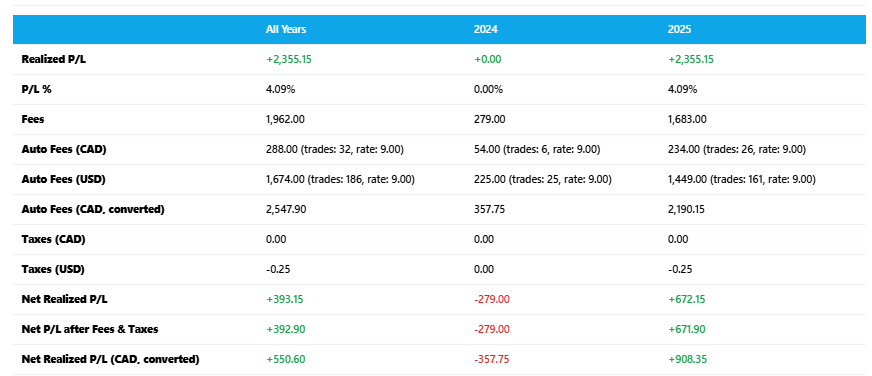
Calculate capital gains and losses for your Canadian tax return (Schedule 3, Line 12700). Import broker statements (Questrade, IBKR, RBC, etc.), match buys to sells, fix missing or incorrect lots, and export a tax-ready summary. Saves hours vs. manual spreadsheets.
How to use
Open the Import/Export tab, choose your broker format (Questrade, Interactive Brokers, RBC, etc.) and upload your CSV. FamilyFunds automatically reads your full trade history.
The system auto-matches each sell to the correct buy lot using the ACB method. Review unmatched lots, adjust quantities, or add missing buy records for prior years.
Download a tax-ready capital gains summary for your accountant or CRA Schedule 3, Line 12700 — includes total proceeds, ACB, and net gains/losses by year.
Capabilities
Import CSV from major brokers, auto-matching of buys/sells, cost basis (ACB) calculation, tax lot tracking, capital gains report, corrections for prior years, export summary for your accountant or CRA.
🤖 Service 3: AI Analytics
Purpose
Get AI-powered insights tailored to your holdings. Discover undervalued ETFs, top dividend stocks, S&P 500 opportunities, and portfolio ideas. Chat with an assistant that knows your portfolio — ask 'Which stocks performed best?' or 'Good Canadian ETF for growth?'
How to use
What the AI Shows You
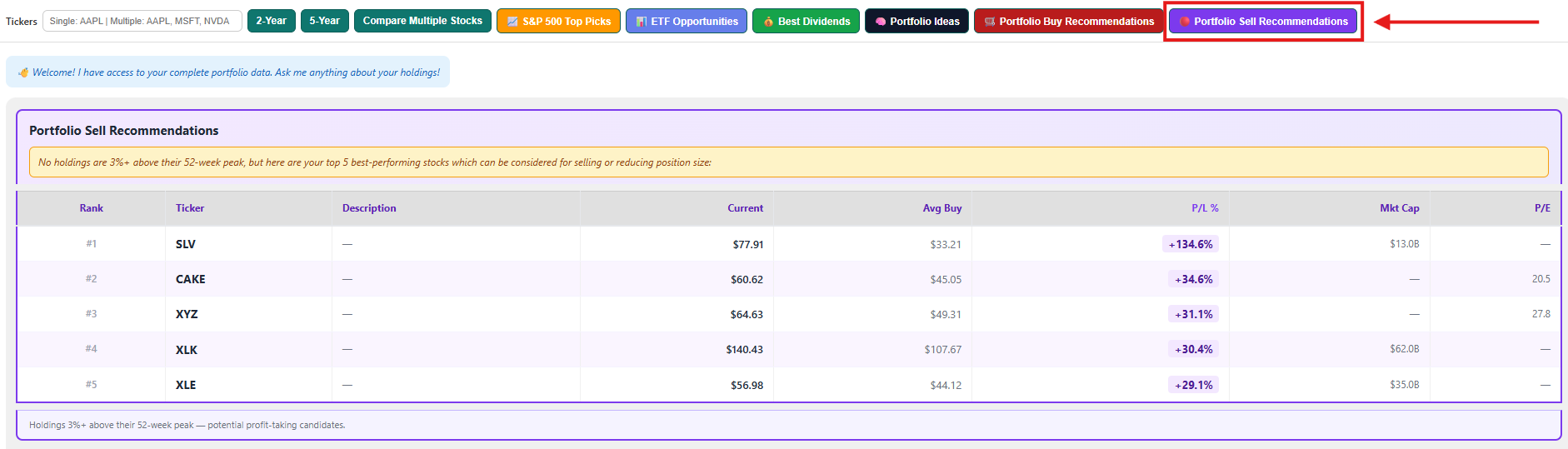
The full AI-powered analytics interface — chat with your portfolio, run one-click scans, compare stocks and get instant insights on any market condition.
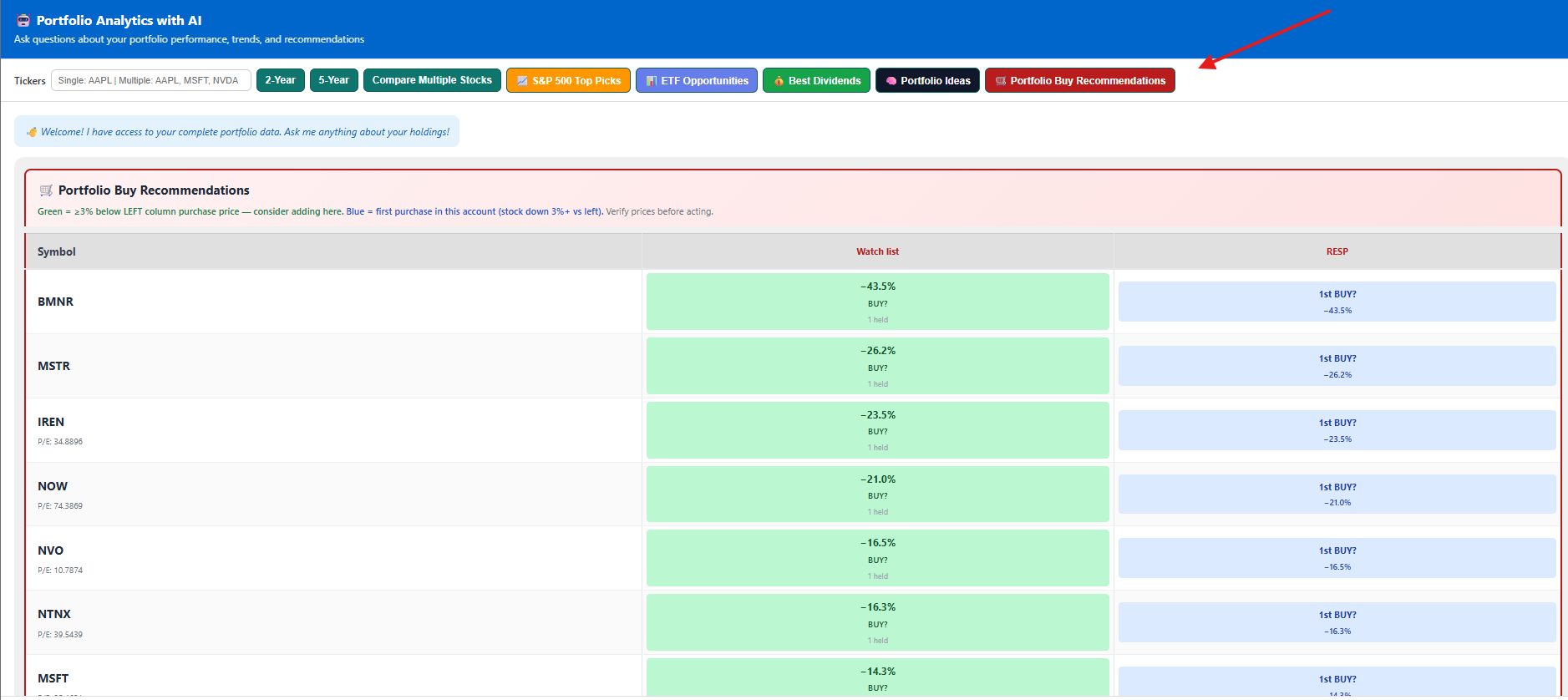
AI highlights every holding in your portfolios that is down 3%+ from your purchase price — ranked by biggest discount. Green = strong add candidate right now.
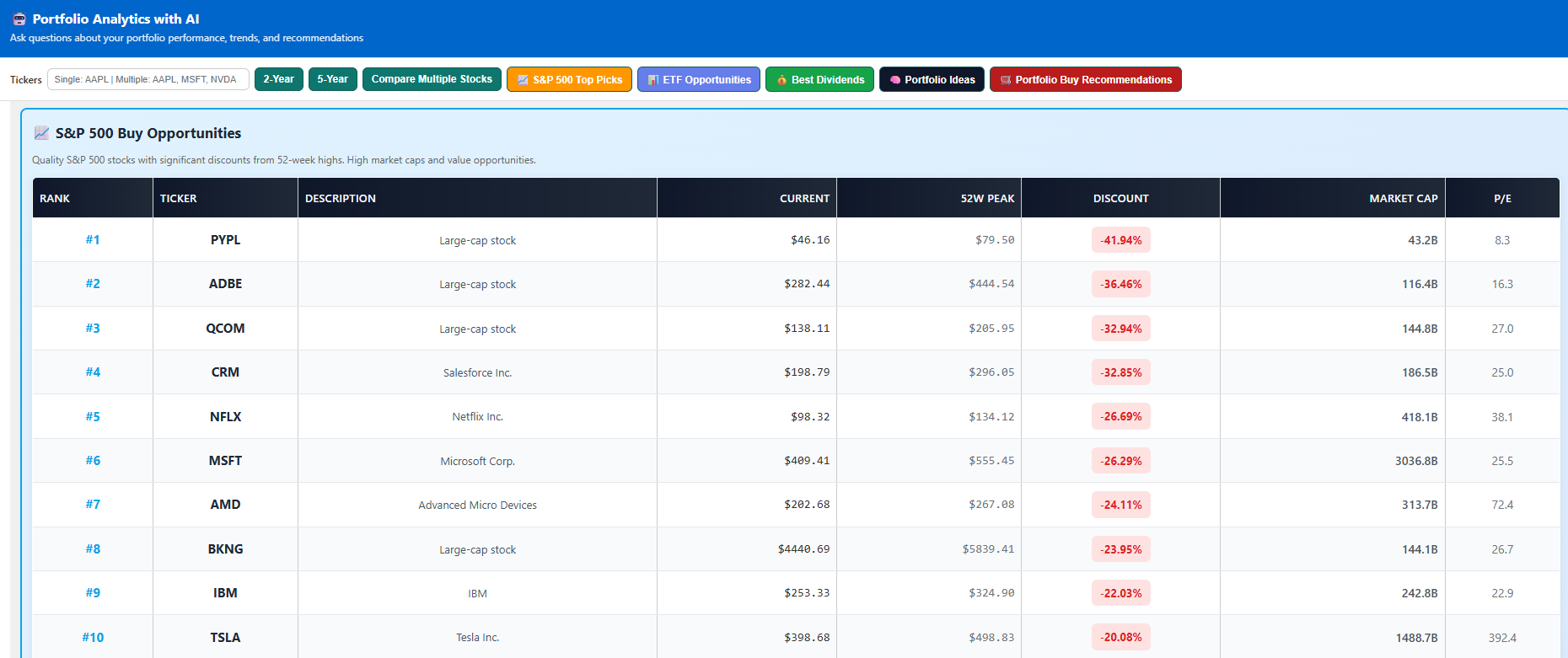
Scans the entire S&P 500 for large-cap stocks at steepest discounts from 52-week highs. Ranked by discount with current price, 52W peak, market cap and P/E.
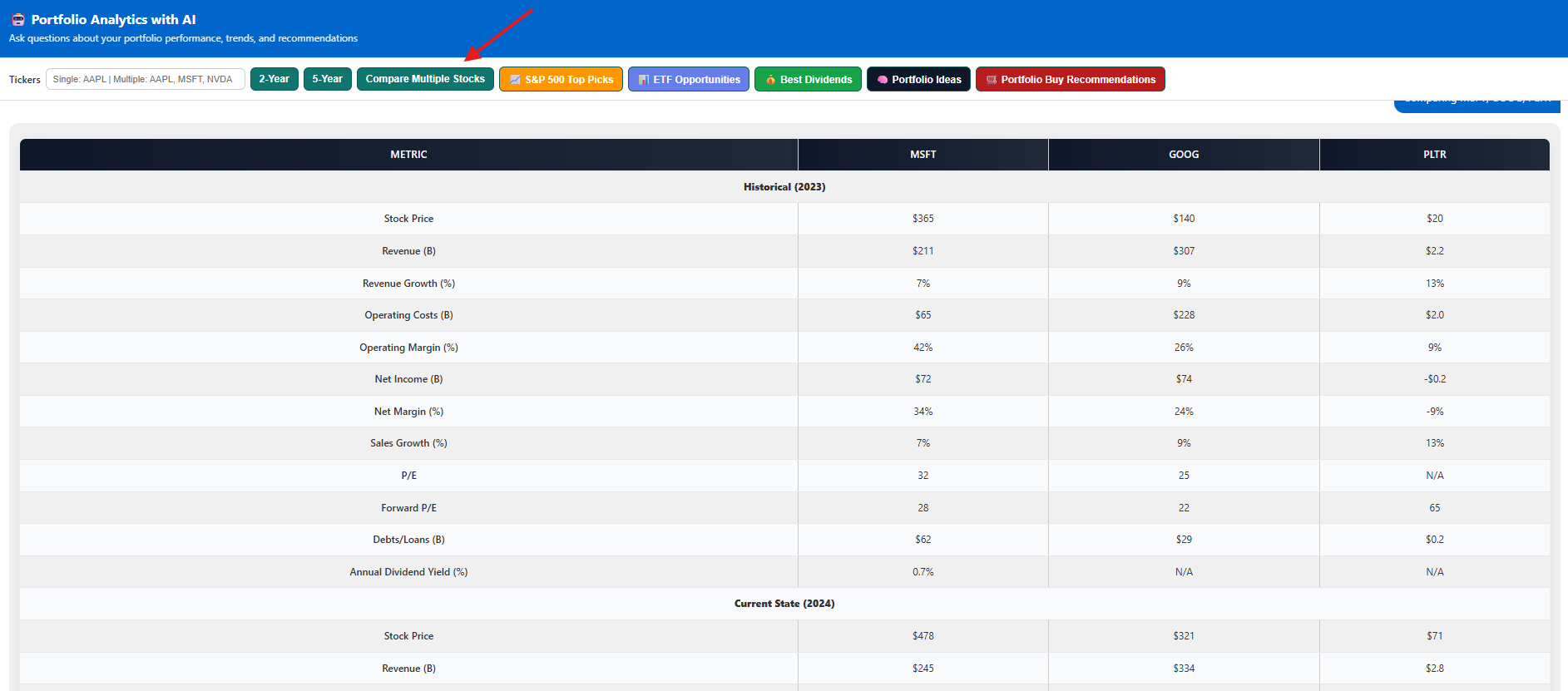
Side-by-side financial metrics for 2–4 stocks — historical and current revenue, margins, P/E, debt and more.
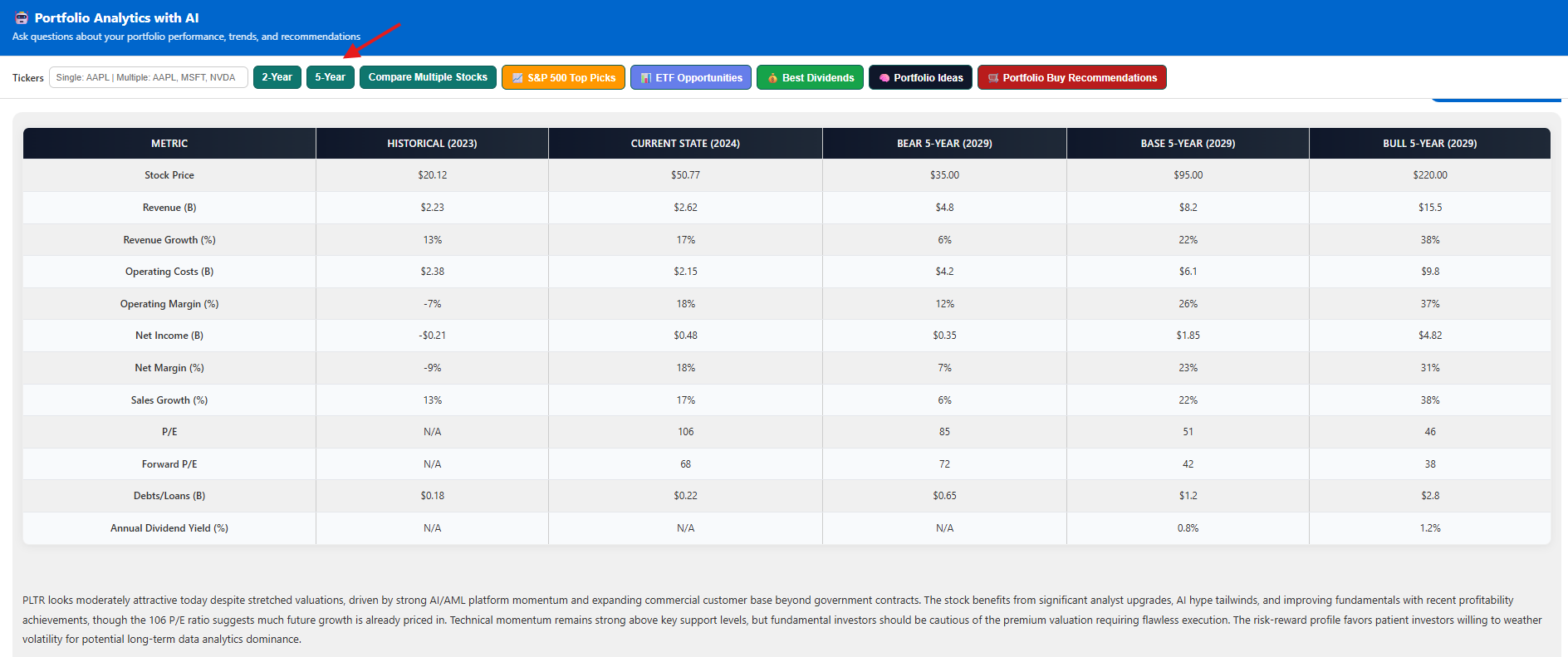
Bear / Base / Bull projections for any stock with revenue, margin, P/E and AI reasoning.
Scans all your holdings for positions 3%+ above their 52-week peak — ranked by profit potential. No sell signals? The AI surfaces your top 5 best-performing stocks by P/L % instead, so you always leave with actionable insight.
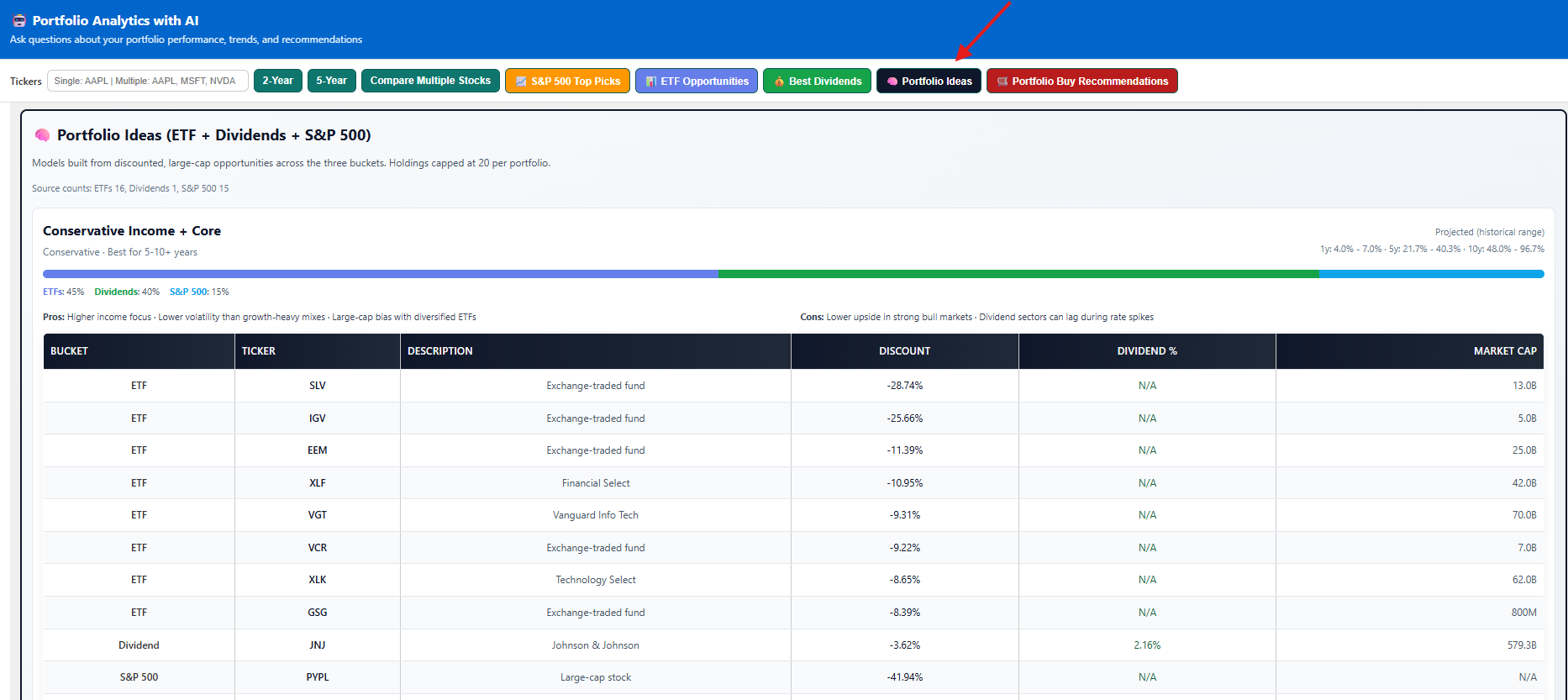
AI-curated model portfolios (Conservative, Balanced, Growth) built from discounted ETFs, dividend stocks and S&P 500 picks — with projected 1, 5 and 10-year historical ranges.
Capabilities
S&P 500 and ETF opportunity scans, dividend analysis, portfolio ideas (balanced models), buy recommendations vs. your cost basis, AI chat about your holdings, 2yr/5yr performance charts.
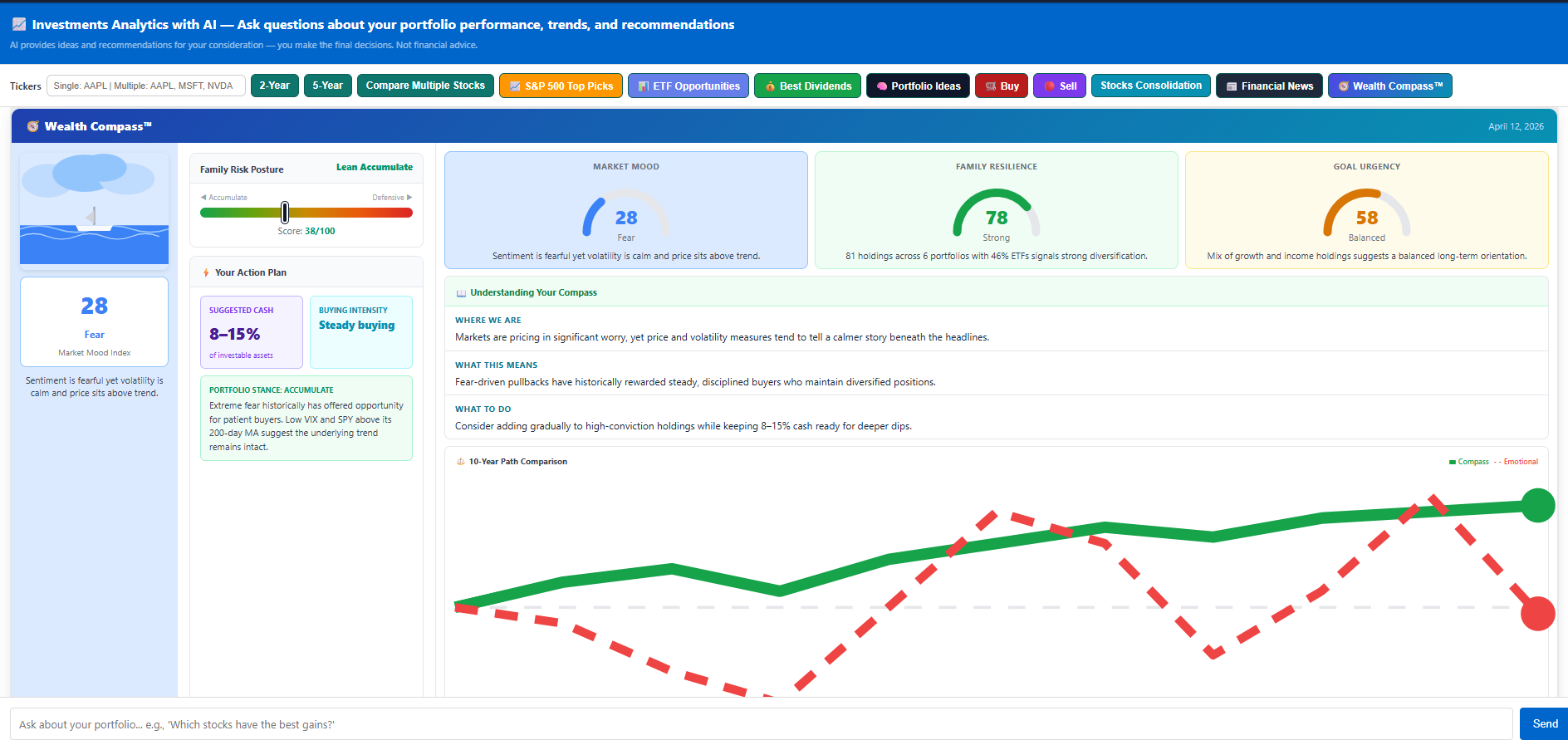
Wealth Compass™ — Market Mood Index, Family Resilience, Goal Urgency, action plan and 10-year path comparison
🧭 Wealth Compass™
What it does
Wealth Compass combines three real-time signals — the Market Mood Index (fear/greed from VIX and price action), your Family Resilience score (portfolio breadth, ETF diversity, cash buffer), and a Goal Urgency rating (growth vs. income balance) — into one dashboard. The result: a concrete action plan that tells you exactly how much cash to hold right now and how aggressively to buy, updated every time you open it.
How to use it
The dashboard loads in your chat window. At the top you see three gauge cards: Market Mood (0–100), Family Resilience (0–100), and Goal Urgency (0–100). Hover any card for a plain-English explanation.
The left panel shows your Family Risk Posture on a slider (Accumulate ↔ Defensive), a suggested cash allocation range (e.g. 8–15% of investable assets), and a buying intensity label — Steady Buying, Cautious, Aggressive, or Hold. This is your immediate guidance.
Three short sections explain what is happening in the market right now (WHERE WE ARE), what it historically has meant (WHAT THIS MEANS), and a specific action you can take today (WHAT TO DO). No jargon — plain advice based on your portfolio.
The bottom chart shows two lines: the Compass path (following signal-based discipline) vs. the Emotional path (panic-selling and FOMO-buying). Over 10 years the divergence is dramatic — use it as a reminder to stay the course when markets are volatile.
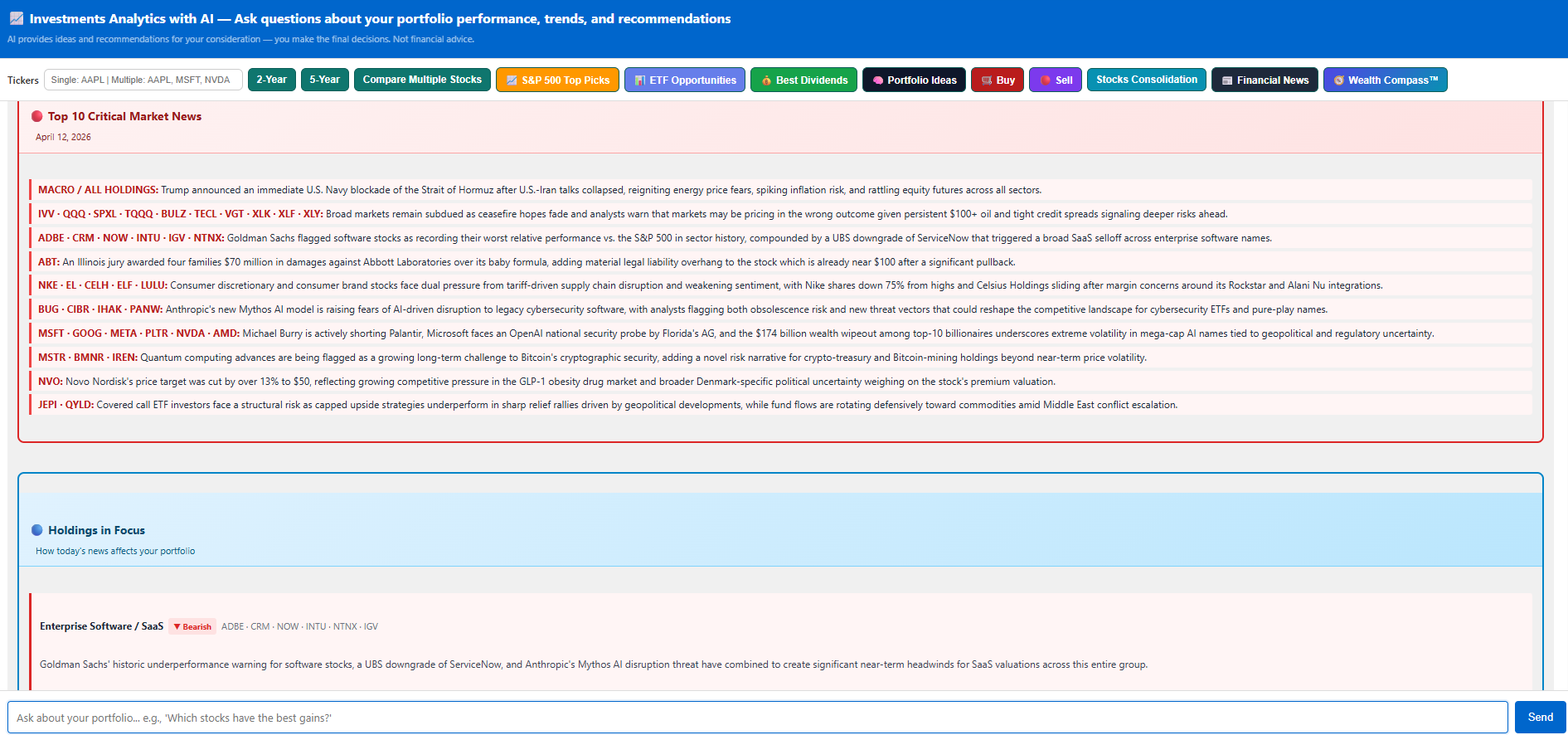
Financial News — AI scans 100+ articles and maps the 10 most critical stories to tickers you actually own
📰 Financial News — Holdings in Focus
What it does
Every day Claude AI scans the latest market headlines — both company-specific and broad macro articles — and filters them down to the 10 most critical stories that affect tickers in your portfolios. Each news item is tagged with the relevant tickers so you instantly know why a piece of news matters to you. The summary shows the total count of stocks checked, company articles reviewed, and macro articles analysed so you always know the analysis scope.
How to use it
A loading spinner shows while Claude fetches and analyses live articles. The result appears in your chat window — no page reload needed.
Each item starts with a ticker tag (e.g. GOOG / ELF / MACRO/OIL) so you immediately see which of your positions is affected. The summary is 1–2 sentences — concise enough to scan in under a minute.
The header line shows how many stocks were checked (e.g. 78), how many company articles were read (e.g. 149), and how many macro articles were included (e.g. 5). This tells you the breadth of the scan — a higher count means more comprehensive coverage that day.
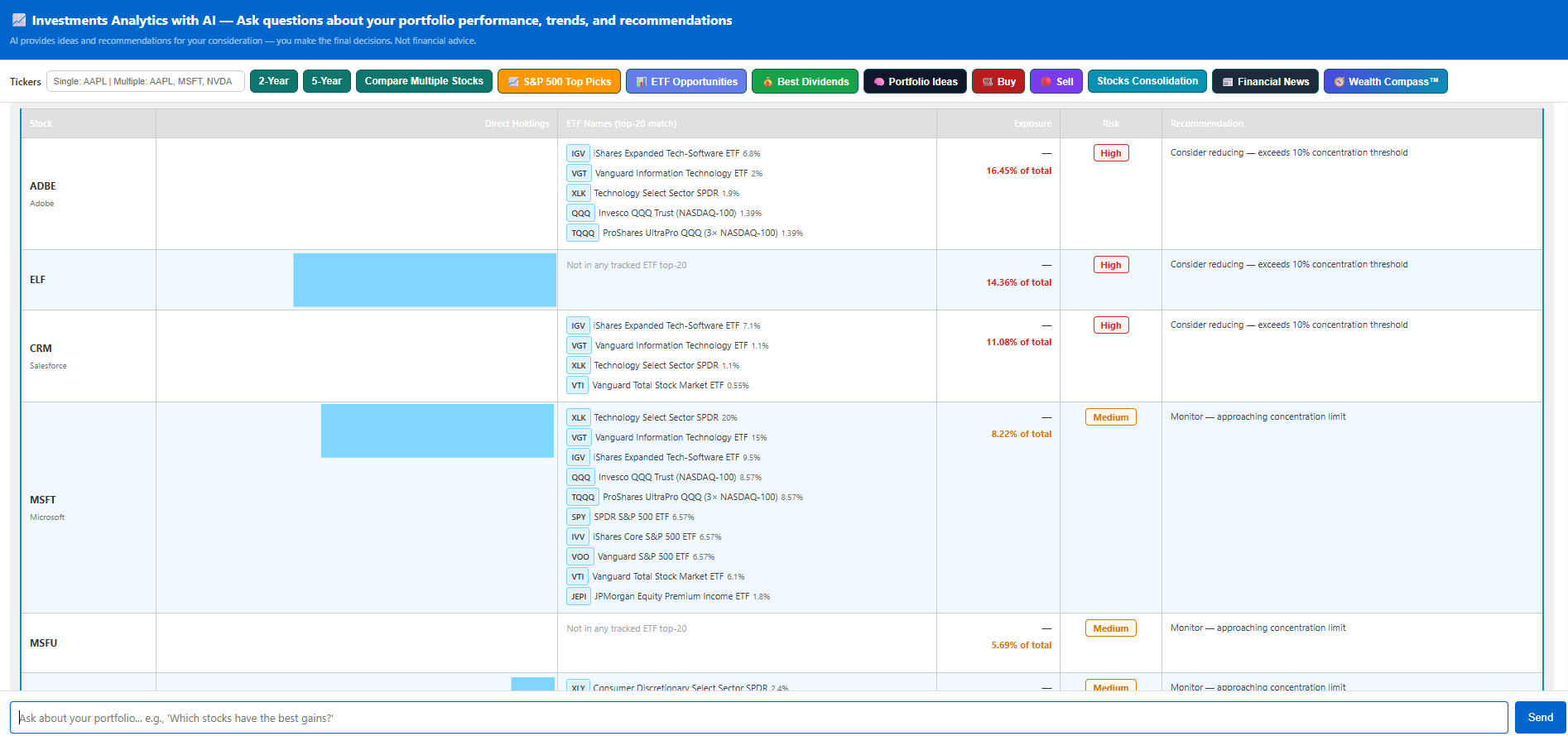
Stocks Consolidation — combined exposure across direct holdings and ETF top-20 holdings with risk flags
📋 Stocks Consolidation — Know Your True Exposure
What it does
Your portfolio may look diversified on paper, but if you hold a stock directly and it appears in the top-20 holdings of several ETFs you own, your real exposure is much higher than it appears. Stocks Consolidation cross-references every direct stock holding against the top-20 constituents of all ETFs in your portfolios, adds up the combined exposure percentage, and flags positions as High (over 10%) or Medium risk. Each row includes a plain-English recommendation.
How to use it
The analysis scans all your portfolios. Results appear as a table in the chat window showing each at-risk stock.
Exposure % is the combined weight across your direct holdings and all ETFs that include this stock in their top 20. A position showing 16% means that stock effectively makes up 16% of your total invested assets — even if you only see a small direct position.
High = above 10% — the AI recommends reducing. Medium = 5–10% — monitor closely. Use the ETF names column to see exactly which funds are adding to the overlap.
If a stock is flagged High, consider trimming either the direct position or one of the overlapping ETFs. You do not need to eliminate the position — just rebalance to bring total exposure under 10%.
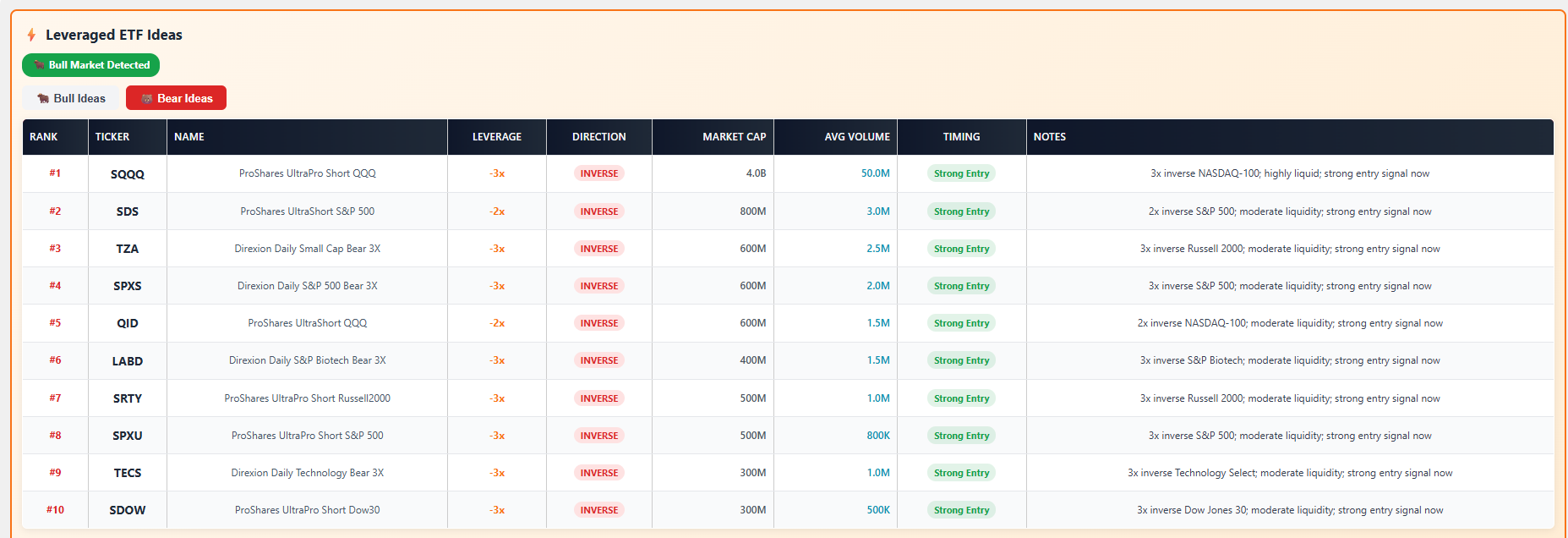
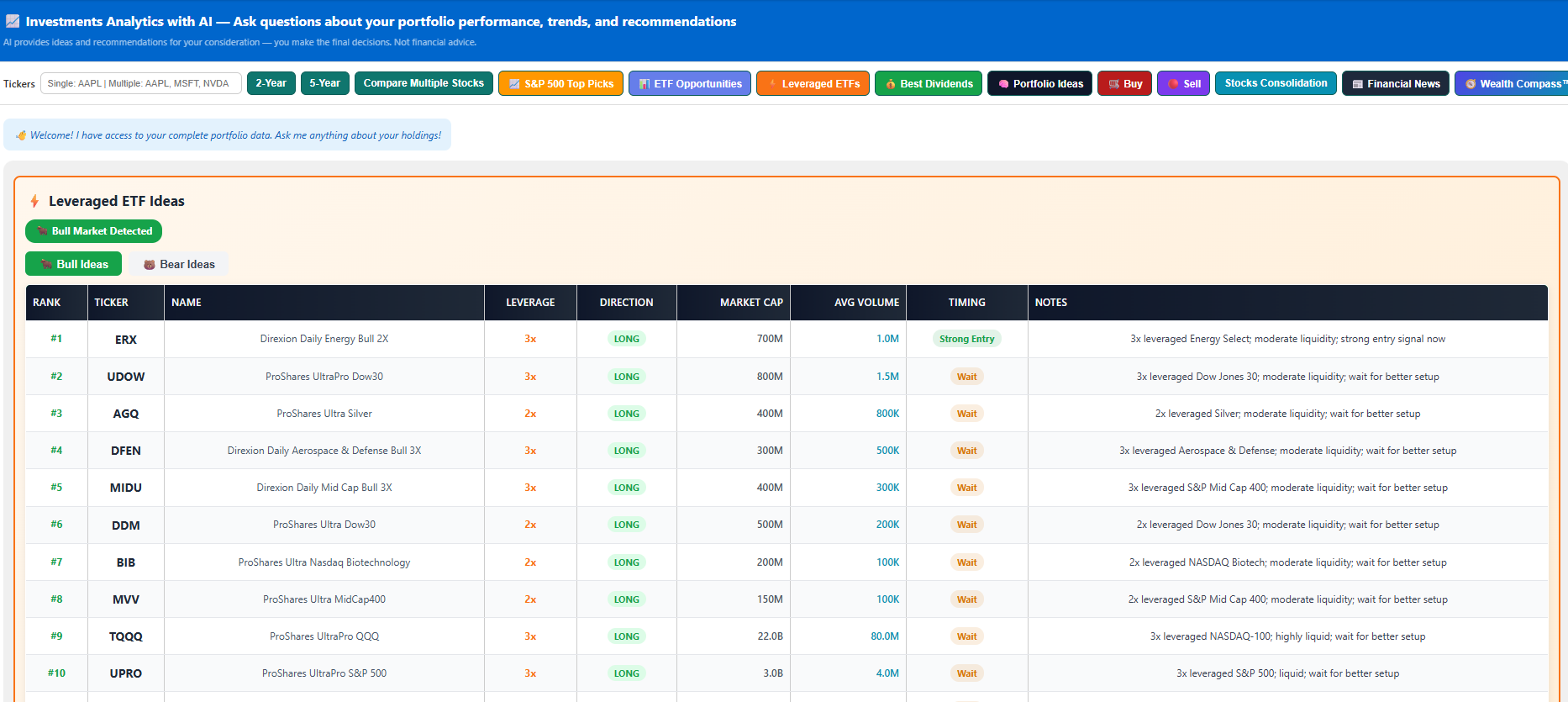
⚡ Leveraged ETF Ideas — Timed Bull & Bear Signals
What it does
This tool detects whether the market is currently in a bull or bear regime (using SPY's 200-day MA and the VIX), then scores 37 leveraged and inverse ETFs using three technical signals on each underlying index: RSI(14), distance from the 50-day moving average, and 5-day momentum. Each ETF gets a Timing badge — Strong Entry, Good Entry, Wait, or Avoid. Only ETFs above $100M AUM and 100K daily average volume are shown.
How to use it
The tool detects the market regime automatically. A green Bull Market Detected or red Bear Market Detected badge appears at the top, and the matching tab is pre-selected.
Only act on Strong Entry or Good Entry signals. A Wait means the underlying is not yet in the right setup — wait for a dip or reversal. Avoid means the timing is poor right now.
Each note explains the leverage multiplier, underlying index, liquidity tier, and timing summary in plain English — e.g. "3x leveraged NASDAQ-100; highly liquid; strong entry signal now."
Bull Ideas shows the top 20 long leveraged ETFs. Bear Ideas shows the top 10 inverse ETFs. You can review both tabs regardless of the detected regime — useful if you want to hedge or you disagree with the auto-detection.
?market_regime_override=bull or =bear if you want to force a specific scenario for research purposes.⭐ Premium⭐ Premium: Small-Business Tracker
Purpose
A complete financial suite for Canadian small businesses. Track income and expenses, log vehicle travel, manage depreciation, create invoices from timesheets, and send bills to clients. Export to XLSX for your accountant. Premium users get direct RCSLogic support tailored to their business.
How to use
Use the Period selector at the top to choose a month or Full Year view. All tabs update instantly to show data for that period.
Navigate between Expenses, Income, Travel, Timesheets, Invoices, Depreciation, Bank Transactions, and more. Each tab is filtered by the selected period automatically.
Click Export XLSX to download a formatted spreadsheet for your accountant. Use Import to bulk-upload or update existing records.
Open the Timesheets tab to log hours by client and project. Then go to Invoices → Create from Timesheet to generate a professional invoice with your company details and send it to the client.
Premium users can contact the RCSLogic team directly to configure the tracker for their industry, tax structure, or specific bookkeeping needs.

Capabilities
Income & expense tabs, timesheet tracking by client, invoice generation from timesheets, client billing, travel log (km + $), depreciation (CCA), cash flow, bank transactions, tax planner, import/export XLSX.
🏠 Service 5: Rental Property Tracker
Purpose
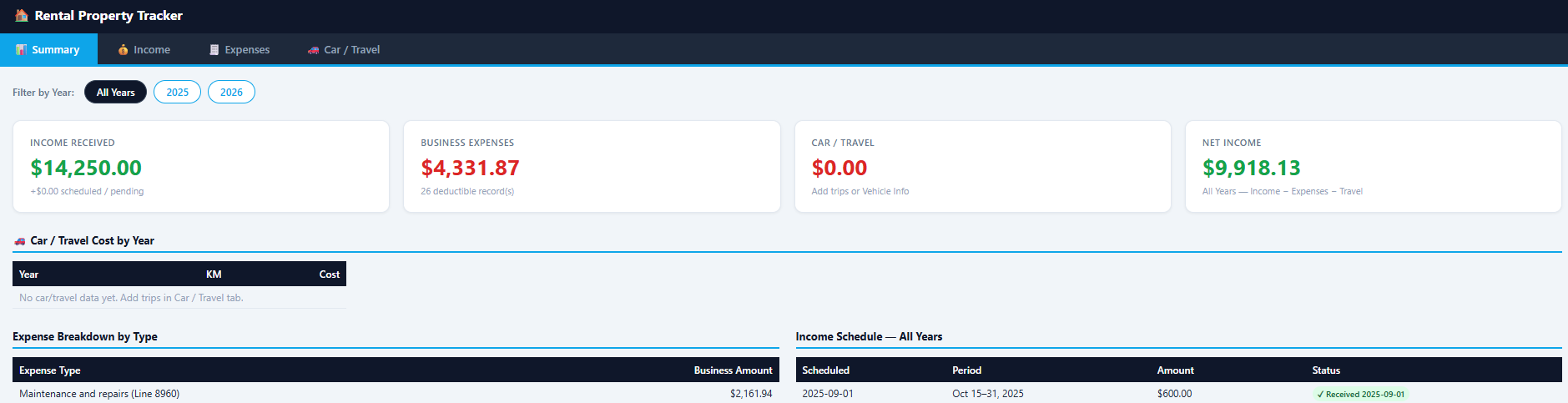
Track rental property income and expenses for CRA Form T776 (Statement of Real Estate Rentals). Record rent received, CRA-categorized expenses (insurance, mortgage interest, repairs, etc.), and vehicle travel — using either the kilometre rate or actual expense method per CRA rules.
How to use
In the Income tab record monthly rent (scheduled vs. received). In Expenses, select the CRA T776 category — line references are shown — and enter the amount including or excluding GST as applicable.
Log each business trip: date, destination, purpose, and kilometres driven. FamilyFunds calculates the CRA per-km rate deduction automatically, or switch to the actual expense method.
Export as an Excel file pre-formatted for T776. Import from XLSX to bulk-enter data. Use Backup to save a snapshot before year-end filing.
Capabilities
Income schedule (scheduled vs. received), expense categories (T776 line references), travel log (CRA km rate or actual $), import/export Excel template, backup history, summary by year.
Where does your money go?
💰 Service 6: Family Budget
Purpose
See where your money goes. Add bank accounts and credit cards, record or import transactions (CSV from your bank), and get a clear breakdown by category. Understand spending patterns, find leaks, and plan better. Works for individuals and families.
How to use
Go to the Accounts tab and click Add Account. Name each account — Chequing, Savings, Visa, Mastercard, etc. Add as many as your household uses.
In the Transactions tab add records manually or click Import CSV to upload your bank's export file. Assign each transaction a category — Food, Housing, Transport, Entertainment, etc.
Open the Summary tab for a breakdown by category. Sort by amount to instantly see where the most money is going each month.
Capabilities
Multiple accounts, transaction list with categories, CSV import, monthly summary by category, search and filter, backup & restore.
🏖️ Service 7: Planning
Purpose
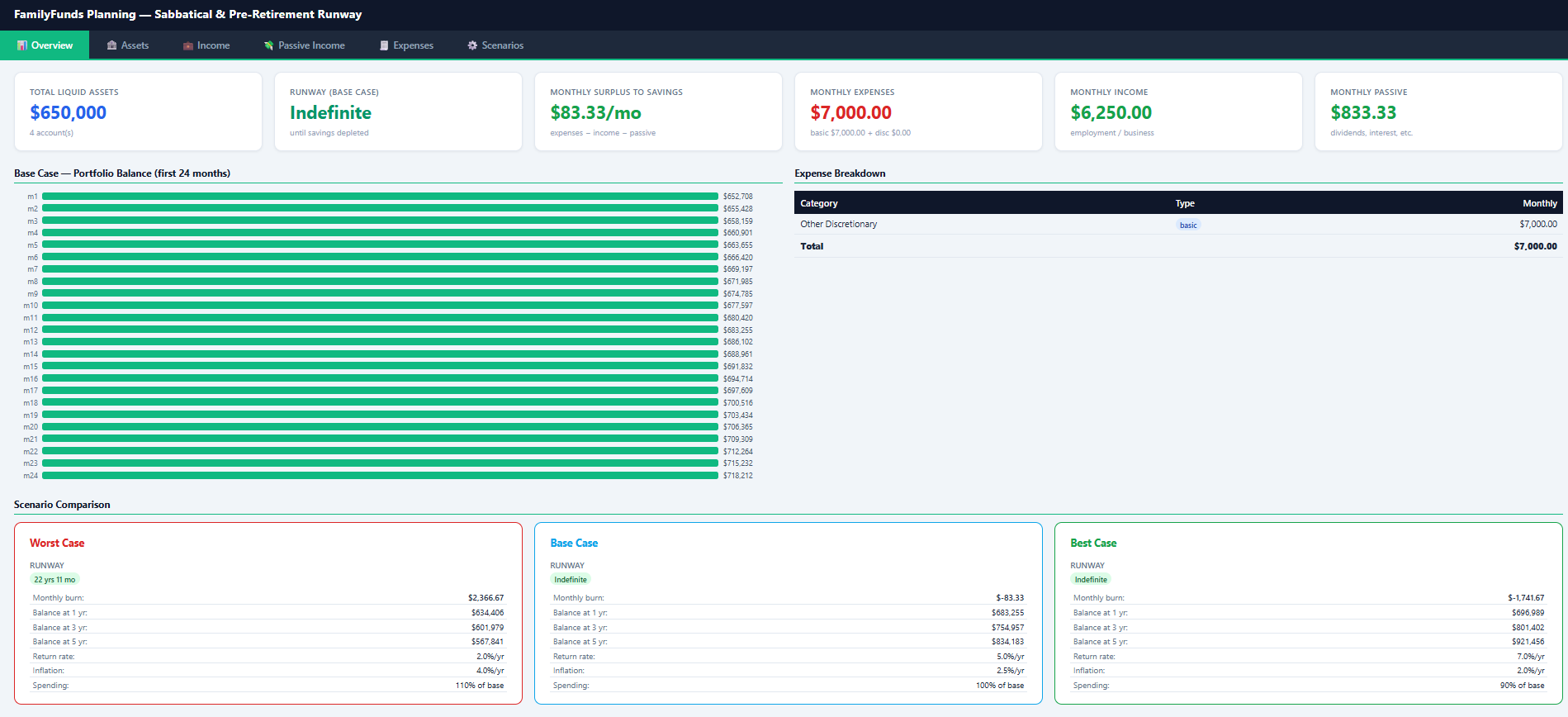
Model how long your savings will last during a sabbatical, career break, or early retirement. Enter assets, expected income, passive income, and monthly expenses — then see worst, base, and best-case scenarios. Answer: 'How many months can I sustain without a paycheck?'
How to use
Enter your current liquid savings and assets, any expected part-time or freelance income during the break, and all passive income streams (dividends, rental, etc.).
List all monthly expenses — housing, food, transport, subscriptions, insurance. Add one-time planned expenses (travel, courses) as needed.
See three runway scenarios — Worst (conservative income, higher spending), Base (average), Best (optimistic). Each shows how many months you can sustain without a full paycheck.
Capabilities
Assets and income inputs, expense breakdown, three scenarios (worst/base/best), months of runway, flexible start dates, notes for assumptions.
🎯 Service 8: Retirement Plan
Purpose
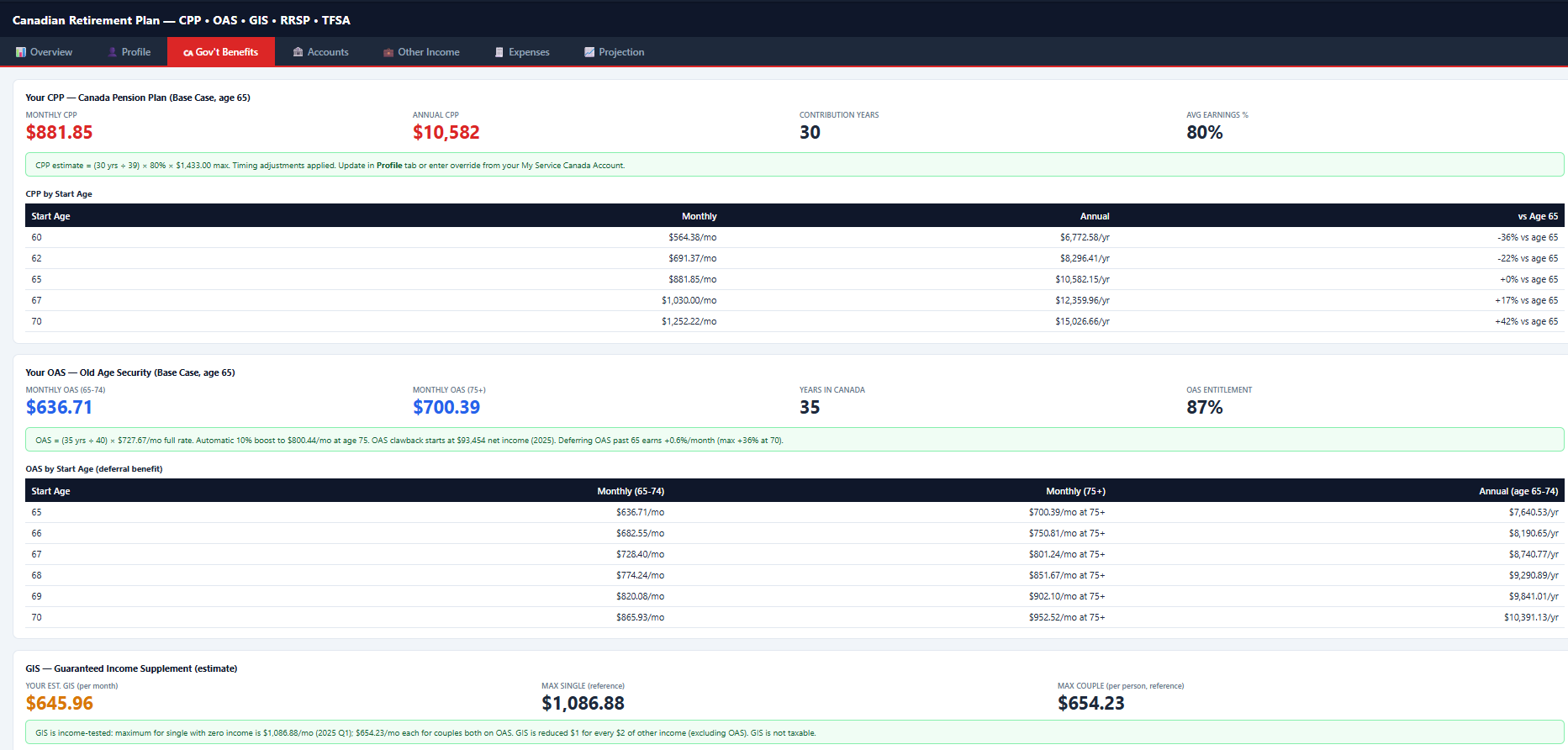
Plan your full Canadian retirement with official 2025 rates. Model CPP, OAS, GIS, RRSP, TFSA, LIRA — year by year to age 95. Compare scenarios (e.g., CPP at 65 vs. 70), spouse benefits, and see if income covers expenses. Override with your My Service Canada amounts for accuracy.
How to use
Enter your birth year, province, and estimated CPP contributions. If you have a My Service Canada account, use your actual CPP estimate for maximum accuracy.
Input your RRSP, TFSA, and LIRA balances with expected growth rates. Set the CPP and OAS start ages — compare taking CPP at 65 vs. deferring to 70 (42% higher monthly benefit).
Add other income sources — employer pension, part-time work, rental — and enter projected monthly expenses in retirement (housing, food, health, travel, etc.).
View a year-by-year projection to age 95. Switch between three scenarios and see whether income covers expenses at every age. Identify the year the gap appears.
Capabilities
Profile (birth year, province, CPP inputs), Gov't Benefits (CPP/OAS/GIS estimates or overrides), RRSP/TFSA/LIRA accounts, other income, expenses, year-by-year projection, three scenarios, household totals.
CRA-style annual tracking
💼 Service 9: Self Employed Tracker
Purpose
Track income, expenses, home office, and capital assets for your sole proprietorship. Annual view with fixed CRA-style categories. Matches the Self_employed.xlsx spreadsheet — enter income, 17 general expense categories, home office area and 10 home office expenses, and up to 4 capital assets per year.
How to use
In the Profile tab enter your business name, address, and GST/HST registration number if applicable.
Enter your total annual revenue in the Income tab. All amounts should include GST/HST as received.
Fill in the 17 CRA expense categories — advertising, professional fees, insurance, office, supplies, travel, and more. Only include business-use amounts.
In Home Office enter your office area vs. total home area (e.g. 12m² / 100m² = 12%). Add home costs — heat, electricity, rent, etc. In Capital Assets record major purchases. The Summary tab shows net business income with all allocations.
Capabilities
Year selector, single income field, 17 general business expense categories, home office area (sq ft) + 10 home office expense categories, 4 capital asset slots (name + amount), net summary with allocated home office.
Payment + affordability
🏠 Service 10: Family Mortgage
Purpose
Calculate your mortgage payment (Canadian semi-annual compounding) or see what you can afford. GDS/TDS based affordability — max payment from income, debts, property tax, heat. Risk-free rules: 30% of gross income recommended, 25% conservative.
How to use
In the Payment tab enter principal, annual rate, and amortization. Choose monthly, bi-weekly, or accelerated bi-weekly frequency. Optionally enter home price + down payment % to auto-calculate the CMHC-adjusted principal (for down payments under 20%).
Open the Affordability tab — enter gross household income, monthly debts, property tax, and heat. See your GDS/TDS limits, the 30% of income recommended rule, and the resulting maximum principal.
The Strategy tab gives guidance on fixed vs. variable, prepayment options, and when to use a mortgage broker. Combines your affordability and payment results in one recommendation.
Capabilities
Monthly, bi-weekly, accelerated bi-weekly payments, CMHC for down <20%, max principal from GDS/TDS, 30%/25% income rules, home price 4×–4.5× rules of thumb, strategy guidance.
T1 2025 · CRA-aligned
📒 Service 11: Family Book-Keeping
Purpose
Sync all your incomes, gains, and losses into Family Book-Keeping from the other services the platform provides. CRA-aligned T1 preparation for tax year 2025 — complete your profile, enter income and deductions, and get a live federal tax estimate.
How to use
Fill in your Profile tab: SIN, province of residence, marital status, dependants, and principal residence details. Many deductions are calculated from these automatically.
In the Income tab enter T4 employment income, dividends, and other income. Use the Sync buttons to pull capital gains from Calculator, rental income from PropTrack, and business income from Business Tracker — no manual re-entry.
Enter RRSP contributions (within your deduction limit), eligible medical expenses, charitable donations, and other CRA deductions to reduce your taxable income.
Open the Tax Summary for a live federal estimate. Then use the CPA Portal tab to generate a secure share link and send your full file to your accountant — no PDFs, no email attachments.
Capabilities
CRA T1 workflow, live federal tax estimate, capital gains sync (Calculator), rental sync (PropTrack), business sync (Business Tracker), CPA portal with secure link sharing.
100 guided questions — AI explains each step
📝 AI Will Builder
Purpose
Help Canadian families create a proper Will without the $3,000–$5,000 lawyer fee for a first draft. Answer 100 targeted questions about your estate, beneficiaries, guardians, and wishes — the AI generates a complete Will document tailored to your answers. Always review with a legal specialist before signing.
How to use
Enter your full legal name, province, marital status, children, and any dependants. The AI uses this to personalize all subsequent questions — answers about guardians and trusts are only shown if you have minor children.
Choose your executor (the person who carries out the Will) and primary beneficiaries. Specify alternate beneficiaries in case a primary predeceases you. Add specific bequests for items like property, vehicles, or sentimental objects.
Work through questions about residue distribution, debt handling, charitable gifts, and digital assets. Each question includes an AI explanation of the legal implications and what most Canadian families choose.
The AI generates a complete Will document from your answers. Read through it carefully, then use the Legal Specialist button to connect with a licensed lawyer or notary for review, signing, and witnessing.
Capabilities
Covers executor and alternate executor, primary and contingent beneficiaries, specific bequests, residue distribution, guardians for minor children with trust provisions, debt instructions, digital assets, charitable giving, and funeral wishes. Generates a plain-language Canadian Will document ready for legal review.
Identify gaps before they become expensive
🛡️ Insurance Planning
Purpose
Most Canadian families are either under-insured in some areas or paying for overlapping coverage they don't need. Insurance Planning maps what you have against what you actually need — and shows exactly where the gaps are before they become expensive problems.
How to use
Add your current coverage: life insurance (term or whole), disability, critical illness, home, and auto. Include policy limits, premiums, and beneficiaries. Import from documents or enter manually.
Enter your household income, number of dependants, mortgage balance, and any business obligations. The tool calculates how much coverage you actually need for income replacement and debt protection.
See a visual breakdown of each policy type — green means adequate, yellow/red means a gap. The analysis compares your current coverage against your calculated needs and flags high-priority gaps.
Use the Specialist button to connect with a licensed insurance advisor for your specific gap, or review AI-generated optimization tips to reduce premiums without reducing coverage.
Capabilities
Covers life (term and whole), disability income, critical illness, home, auto, and business insurance. Calculates income replacement needs, debt coverage requirements, and dependent care costs. Tracks all policies with renewal dates and premium totals. Connects with 4 specialist types: car, home, business, and life insurance advisors.
Your entire financial picture — one screen
🏠 Family Analytics Dashboard
Purpose
When your finances are spread across portfolios, bank accounts, properties, and retirement accounts, it is hard to see the whole picture at once. Family Analytics pulls everything together — net worth, monthly cash flow, retirement date, and smart alerts — into one dashboard that updates every time you use any FamilyFunds service.
How to use
Family Analytics automatically reads from your Portfolio tracker, Budget & Expenses, Retirement Planner, Financial Planning, and Property Tracker. No manual entry required — keep those services up to date and the dashboard reflects the latest numbers instantly.
See total assets minus liabilities broken down into: investable assets, retirement accounts (RRSP/TFSA/LIRA), property equity, and cash. The net worth trend chart shows month-by-month changes so you can see if you are building wealth.
The Cash Flow Trend section shows rolling 3-month and 6-month averages for income and expenses, imported from your Budget tracker. Outlier months (one-time windfalls or unusual expenses) are automatically detected and excluded from the averages so they don't distort the picture — but shown for reference.
Smart Alerts scan all your data and surface the most important gaps: emergency fund coverage, RESP contribution targets, savings rate, portfolio concentration, and retirement income sufficiency. Each alert links directly to the service where you can take action.
Capabilities
Net worth tracking (assets, liabilities, equity), cash flow trends with 3/6-month rolling averages and outlier exclusion, retirement runway projection, household financial health score (0–100), smart alert system, and financial independence countdown. Reads live data from all FamilyFunds services — no separate data entry.
Example format:
📋 Import: CSV & XLSX
Not all formats supported. Adjust columns or re-export if needed.
| date | activity | symbol | quantity | price |
|---|---|---|---|---|
| 2025-01-15 | BUY | AAPL | 10 | 185.50 |
| 2025-02-03 | SELL | AAPL | 5 | 192.00 |
| 2025-02-10 | BUY | VGRO | 20 | 32.45 |
Calculator: date, activity, symbol, quantity, price.
Portfolio: Symbol, Quantity, Date, Price.
Budget: Transaction Date, Description, CAD$.
Small Business: XLSX: Expenses, Income, Cash Flow, Travel. Export first, edit, re-import.
Rental: XLSX: Income, Expenses, Car Travel.
📐 What is Market Cap?
How big is a company? Market Cap = Share Price × Total Shares.
📊 P/E = Price ÷ Earnings
P/E 15 = you pay $15 for every $1 of profit. Lower P/E = cheaper (or troubled). Higher = growth expected.
💰 What Are Dividends?
Cash some companies pay shareholders from profits. Yield = annual dividends ÷ stock price. 4% = $4 per $100/year.
P/L = profit or loss
📉 P/L & P/L %
In the Portfolio table: P/L = dollars gained or lost. P/L % = same as % of what you paid. Green = up, red = down.
🎬 Quick Video: Investing 101
3-min explainer on stocks, ETFs, and basics. Watch when you have a moment!
Investing for beginners — Investopedia
🏦 CPP, OAS, RRSP, TFSA — Quick
CPP: Gov't pension from working years. Start 60–70; later = more. Learn more (CRA) →
OAS: For 65+ Canadians, 10+ years here. Learn more (CRA) →
RRSP: Tax break now, tax later when you withdraw. Learn more (CRA) →
TFSA: No break now, but growth & withdrawal tax-free. Super flexible! Learn more (CRA) →
Install FamilyFunds on Your Desktop
Premium members can download a native desktop app and run FamilyFunds entirely on their own computer. No internet required after setup. Your financial data never leaves your device.
What you get with the desktop app
Step-by-step: from platform to desktop
setup_config.json to your device
http://127.0.0.1:8765 and your data is imported automatically
Platform-specific notes
setup_config.json file contains your credentials and a data snapshot.
It is automatically deleted after first use — never share it.
You did it!
You're All Set! 🌟
Pick a service and try it. Learning by doing beats reading any day.
← Back to Home